Revise Word agreements from a lawyer’s instructions
Your model can draft a change to a clause from a lawyer’s instructions. SuperDoc puts that edit into the firm’s Word draft as a tracked change for the lawyer to review.
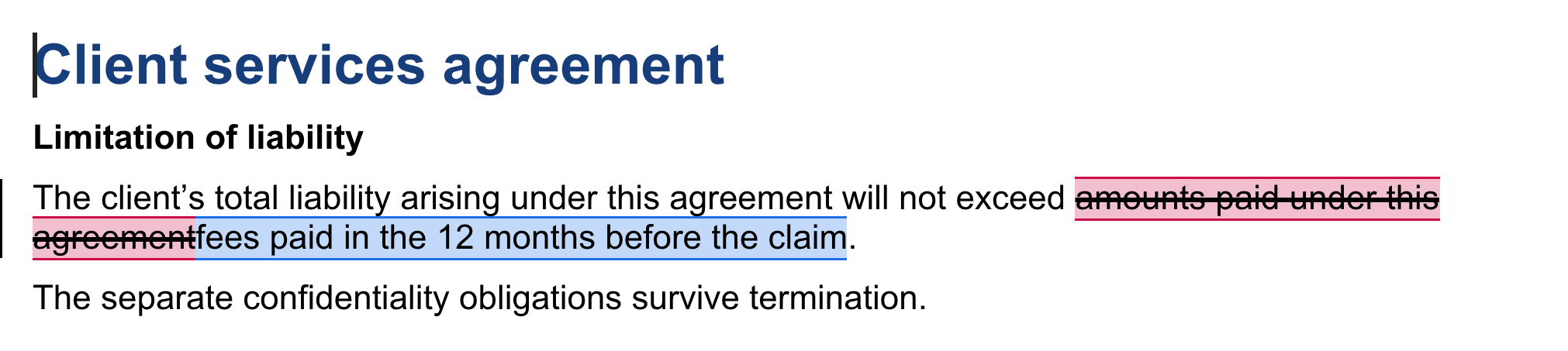
The lawyer asks to cap liability at fees paid in the 12 months before the claim.
The lawyer can see the original cap and the proposed wording in the same clause.
How does a lawyer’s instruction reach the right clause?
Your app opens the matter draft and gives your model the instruction and relevant clauses. SuperDoc applies the proposed wording to the selected clause. The lawyer can inspect it in context before sending the editable DOCX.
Use a Word agreement the firm prepared, including documents created from its own templates.
02
Review the change to the liability cap
Check that the cap now refers to fees paid in the 12 months before the claim. Accept or reject the change.
03
Keep the reviewed draft with the matter
Download the DOCX so a colleague or client can keep working in Word.
The browser example starts with a prepared proposal for review.
Build the workflow your firm needs
Start from firm-approved templates
Use the DOCX your practice already maintains. Your application selects the template, validates matter data, and supplies approved clause choices. SuperDoc fills the document’s tagged fields.
Show comments and native tracked changes in your tool. Let a lawyer accept, reject, or revise proposed wording. Test numbering, letterhead, and comments with representative templates before rollout.
Save sent and returned DOCX files as separate versions. Your app records the reviewer, time, and retention rules. Restore an earlier copy without losing the newer version.
Self-host the editor and document tools. Your firm controls document storage, who can open each matter, and what gets sent to its chosen model provider.
Connect the editor to your existing matter system and agent. Your firm decides which files and clauses the model can read, who may review a proposed edit, and who can send the document to a client.
Install SuperDoc, build your integration, and test it with your team for free. The install includes DOCX Engine as a dependency. Its separate license is designed to let you use it with SuperDoc’s open-source code under AGPLv3.
One Business license covers all SuperDoc features and uses within your licensed product, including the editor and DOCX Engine in production. You get a private Slack channel with our team for help integrating SuperDoc and troubleshooting tricky Word files as you build and after you ship. A custom Enterprise agreement can cover specific product areas or a defined platform. The order defines the covered products and entities, and you can add coverage as your rollout grows.
Tell us about the contract tool you want to build and what must survive review and export. Our engineers can help you design the first test using a synthetic or approved representative file. Leave client document contents out of the form.