Read a DOCX as Markdown
Read the whole file or just a passage. Choose a final, original, or detailed redline view. Detailed reads can include revision and comment annotations, diagnostics, and a source map.
Read the Markdown projection guideDOCX vs. Markdown
Need to import, edit, and export Word files? Keep DOCX as the working format. A plain Markdown round trip loses Word layout, tracked changes, and comments.
Try the public examples without submitting a form.
The DOCX shows two pending tracked changes: 15 to 21 business days for delivery and 2 to 5 days for a review deadline. The final Markdown shows 21 and 5 as ordinary text. It drops both redlines, the original values, who proposed each edit, and the ability to accept or reject them. It also drops the anchored comment, Word heading styles, and two-column layout. A DOCX generated from that Markdown has only the surviving content to work with.
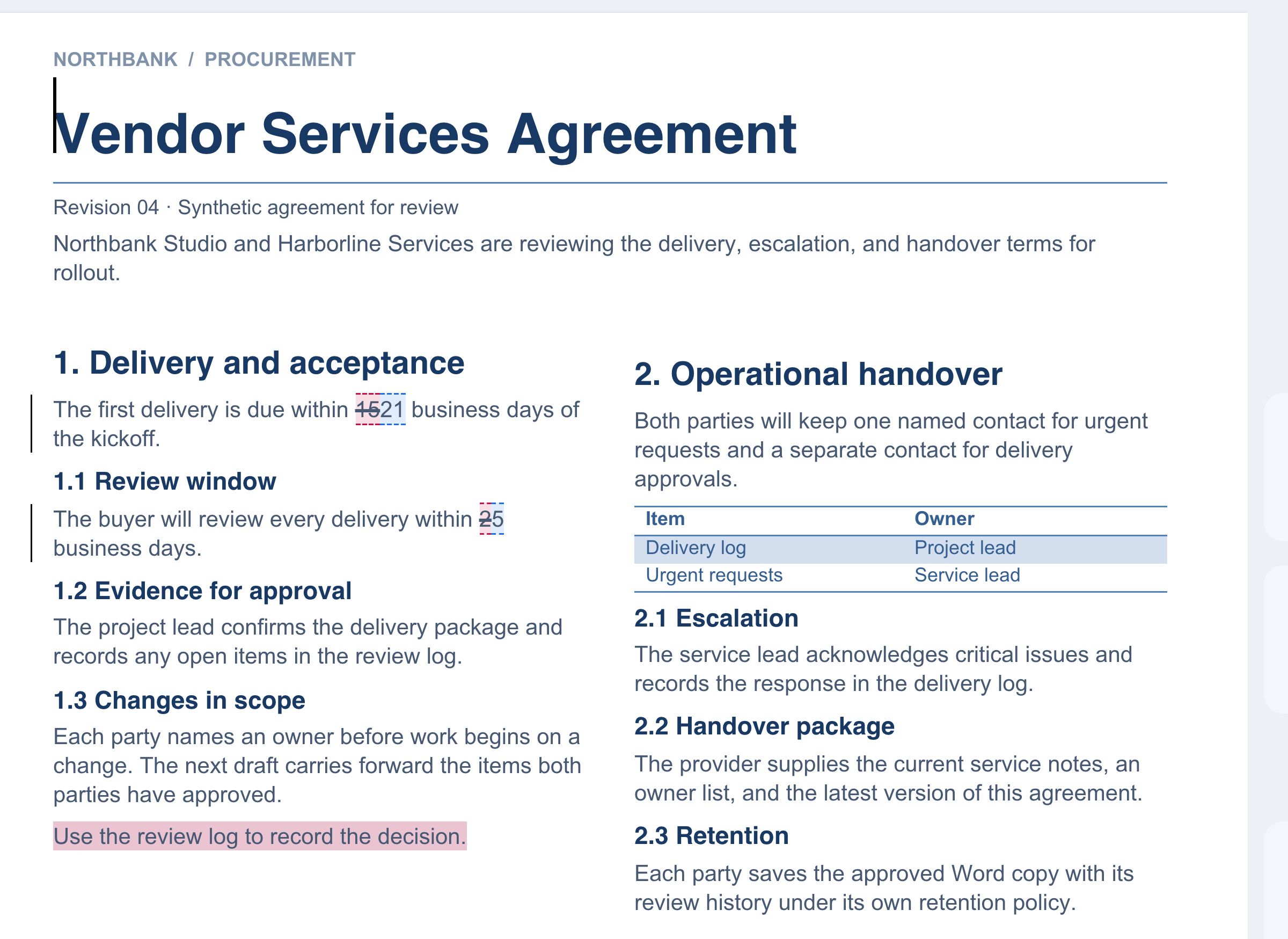
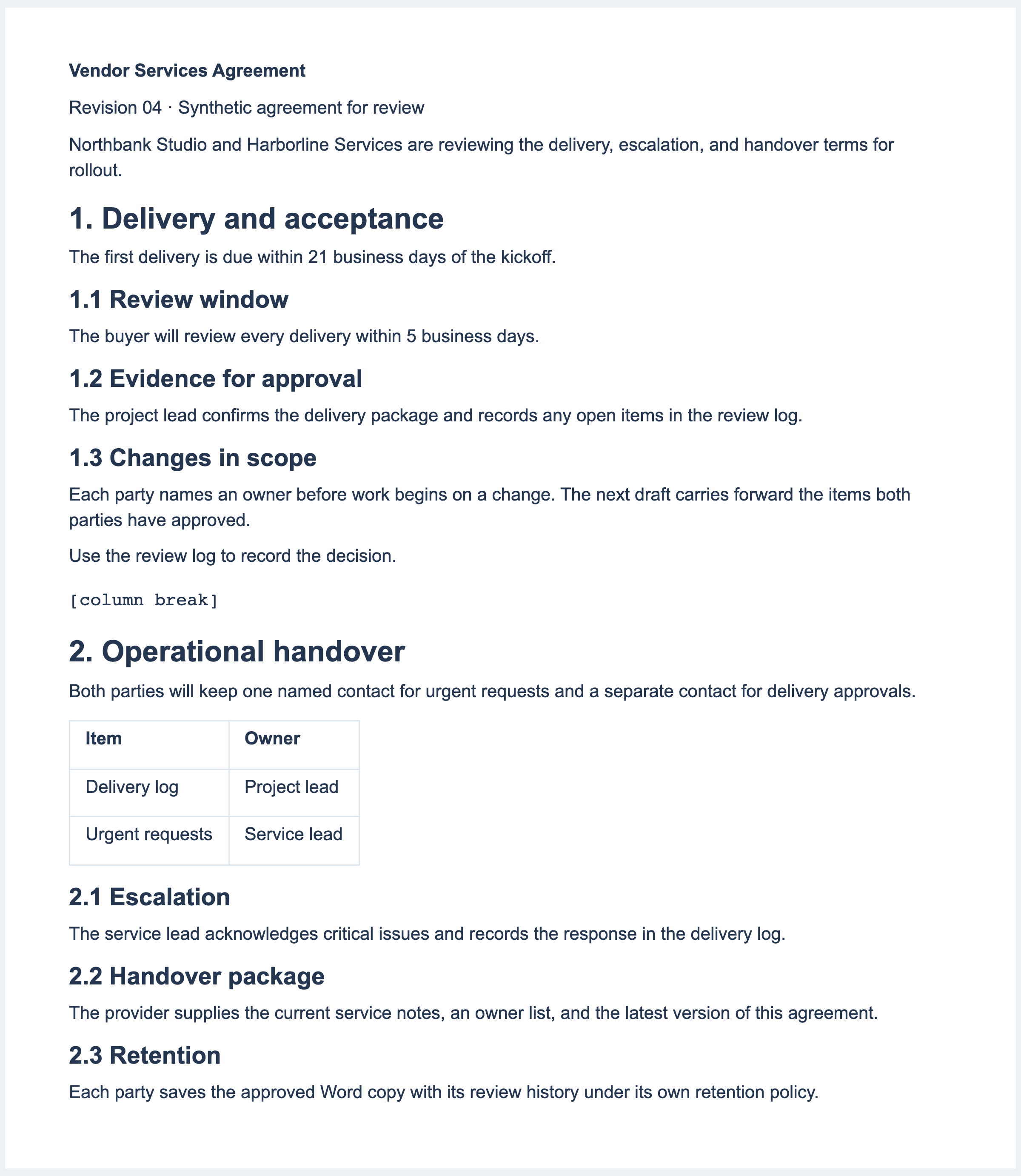
The Markdown image shows the final body view. At the same display width, this single-column view took about 1.6 times as much vertical space as the Word view. Open either image at full size or inspect the sample files below.
SuperDoc renders the uploaded DOCX as editable Word pages, applies edits to its underlying Office Open XML (OOXML), and exports a native DOCX. The file stays DOCX through editing and export. Markdown is a separate view for your model and an optional input for new content.
Give your model a scoped Markdown view. When open edits matter, request a redline view with annotations and a source map.
Send supported Markdown or plain text to the Document API at a current document target. Use tracked mode when a person needs to review the proposal.
Export the editable DOCX with its pending changes and comments. The other party can review it in Word and send their edits back.
Read the whole file or just a passage. Choose a final, original, or detailed redline view. Detailed reads can include revision and comment annotations, diagnostics, and a source map.
Read the Markdown projection guideInsert or replace text with supported Markdown headings, lists, tables, links, and inline formatting. Conversion diagnostics show what was simplified or omitted when importing that content.
See supported Markdown inputPeople can review changes, see who proposed them, and accept or reject them in the app or in Word. Keep your saved file versions and review policy in your application.
See a desktop Word round tripWork with Word styles, tables, numbering, and page layout directly in the DOCX. Check your representative files in the browser and after export in Word, especially when they use custom fonts or complex features.
Read about native DOCX editingIn the sample agreement, the selected clause was 92 UTF-8 bytes. The full body Markdown was 1,583 bytes. This is the size of the text returned by each read.
const match = await doc.query.match({
  select: { type: 'text', pattern: clause },
  require: 'exactlyOne',
});
const target = match.items[0]?.target;
if (!target) throw new Error('Clause not found');

const context = await doc.projectMarkdown({ scope: target, reviewMode: 'final' });
if (context.status !== 'success') throw new Error('Review the projection diagnostics');
const markdown = await propose(context.content);
const edit = await doc.replace(
  { target, type: 'markdown', value: markdown },
  { changeMode: 'tracked', expectedRevision: match.evaluatedRevision, author: { name: 'Example Agent' } },
);
if (!edit.success) throw new Error('Review the edit receipt before saving');
The example uses fixed replacement text. Desktop Word opened and saved the exported DOCX with all three tracked suggestions, the anchored comment, the two-column section, heading styles, and the table.
SuperDoc renders the DOCX as editable pages, including supported Word styles, numbering, tables and section layout. Font availability and complex Word features can change line or page breaks. Load the fonts your templates require and verify the browser display and the exported file in Word separately.
A native DOCX can carry pending redlines, authorship and anchored comments to the reviewer. In the linked desktop Word test, a reviewer changed 15 to 21 days in Word. SuperDoc read the returned change, accepted it, and exported the 21-day clause with the original comment intact. Save separate file versions in your own storage when the workflow calls for a version history.
Yes. Run the editor and document tools in your application, and choose your own model and provider, including a model you host. Your application scopes what the model receives, authorizes writes, and decides when a person must review them. A redline’s author label identifies a proposal in the document. Your application authenticates the caller.
No. Project a block or range to Markdown, or query the document for the relevant text, tables, comments, and revisions. The detailed projection can include fidelity diagnostics and mappings back to the source revision. Refresh the target after an intervening edit. Context size depends on the task and representation you choose.
Give the agent the tools its task needs. It can inspect a target and call a structured action for edits or review decisions. The full preset also lets your agent discover operations for tables, styles, images, headers, and footers as needed. When your app already knows the text and the target, it can call the Document API directly.
Markdown works well for notes, documentation, and drafts that need lightweight formatting. For files people will exchange in Word, keep DOCX as the working format. Use Markdown for context and new content, and keep Word-specific layout and review state in the DOCX.
The editor paginates progressively, and scoped reads let your model work with a smaller part of the file. Test the longest or most heavily redlined samples your users actually edit. Measure browser loading, model time, and document operations separately.
Pandoc’s notes on conversion fidelity · Anthropic’s native tracked changes in Word
The starter lets you review a tracked proposal, change the wording, and export the agreement.
Download the Word review starter. The example includes its setup, public input and pinned dependency versions.
Build accept and reject controls for Word
Your application controls identity, edit permissions, model calls, review policy, storage and saved versions. SuperDoc provides the editor and the document operations.
Try a representative document, or talk through your integration with our team.
Try the free DOCX editor · Get the React starter
Install SuperDoc, build your integration, and test it with your team for free. The install includes DOCX Engine as a dependency. Its separate license is designed to let you use it with SuperDoc’s open-source code under AGPLv3.
One Business license covers all SuperDoc features and uses within your licensed product, including the editor and DOCX Engine in production. You get a private Slack channel with our team for help integrating SuperDoc and troubleshooting tricky Word files as you build and after you ship. A custom Enterprise agreement can cover specific product areas or a defined platform. The order defines the covered products and entities, and you can add coverage as your rollout grows.
Tell us what your users upload, what your agent should change, and what the next reviewer expects to see in Word. Our engineers can help you test those requirements on a synthetic or approved file. Leave client document contents out of this form.
The optional HubSpot form loads with JavaScript. Email [email protected] for engineering help. Marketing consent is separate. Privacy policy.