Fill approved fields in bank notices
Use Word template tags for the recipient, effective date and reference. Your app supplies the values and can check the draft before anyone sends it.
Set up a Word notice templateFor finance and banking software teams
Give your model the approved terms and the analyst’s instructions. SuperDoc applies its proposed change to the risk paragraph so the analyst can review it and download an editable DOCX.
The approved condition requires a monthly receivables aging report.
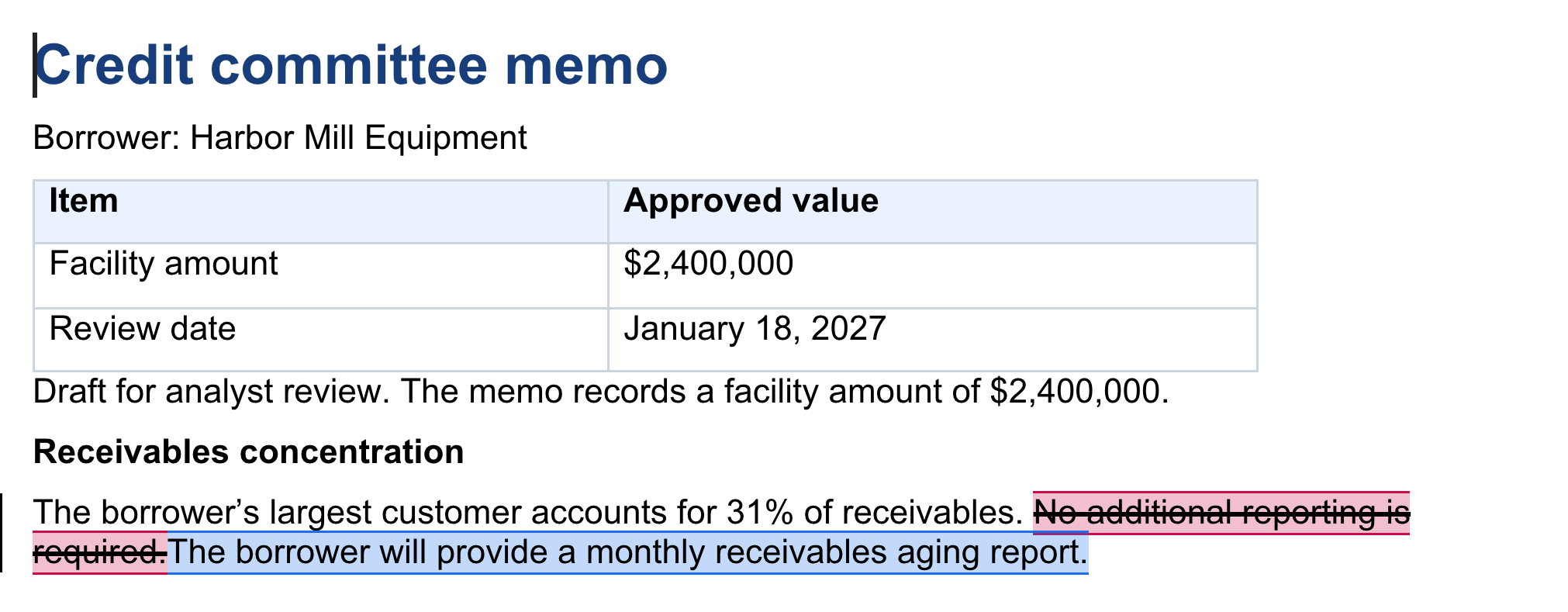
In the sample, the risk paragraph mentions receivables concentration. Your agent proposes replacing the existing reporting sentence with the approved requirement for a monthly receivables aging report. The approved $2.4 million facility stays in the memo.
The memo already contains the borrower, approved facility amount and risk analysis.
Review the tracked edit that requires a monthly receivables aging report. The analyst can accept or reject it.
Export the editable DOCX for the next reviewer.
The synthetic credit memo has the approved $2,400,000 facility amount in its table and narrative. The account notice contains a recipient, an effective date and a reference. Word opened and saved both editable exports.
Download the filled credit memoDownload the memo template · Download the filled account notice · Download the notice template
Use Word template tags for the recipient, effective date and reference. Your app supplies the values and can check the draft before anyone sends it.
Set up a Word notice templateKeep saved DOCX versions with the related record so a reviewer can open the version the team used at the time.
Add version historyChoose where the editor runs and which figures it receives. Your backend controls who can review and export each file.
Review deployment and securityThe script uses a fixed proposal on a synthetic DOCX.
Read the Node.js setup and code. The example includes its setup, public input and pinned dependency versions.
Fill repeated fields from a form
Your application owns the credit decision, approved figures, model and access rules. SuperDoc applies the proposed DOCX edits, displays them for review and exports the file.
Try a representative document, or talk through your integration with our team.
Try the free DOCX editor · Get the React starter
Install SuperDoc, build your integration, and test it with your team for free. The install includes DOCX Engine as a dependency. Its separate license is designed to let you use it with SuperDoc’s open-source code under AGPLv3.
One Business license covers all SuperDoc features and uses within your licensed product, including the editor and DOCX Engine in production. You get a private Slack channel with our team for help integrating SuperDoc and troubleshooting tricky Word files as you build and after you ship. A custom Enterprise agreement can cover specific product areas or a defined platform. The order defines the covered products and entities, and you can add coverage as your rollout grows.
Tell us which template and approved values you want to connect. Use synthetic examples and leave customer or borrower data out of the form.
The optional HubSpot form loads with JavaScript. Email [email protected] for engineering help. Marketing consent is separate. Privacy policy.