Keep delivery date discussions attached to the Word file
Build a delivery date review workflow with SuperDoc comments, replies and DOCX export.
See it in SuperDoc
Keep the question on the delivery date.
Inspect the anchored thread in a real SuperDoc example.
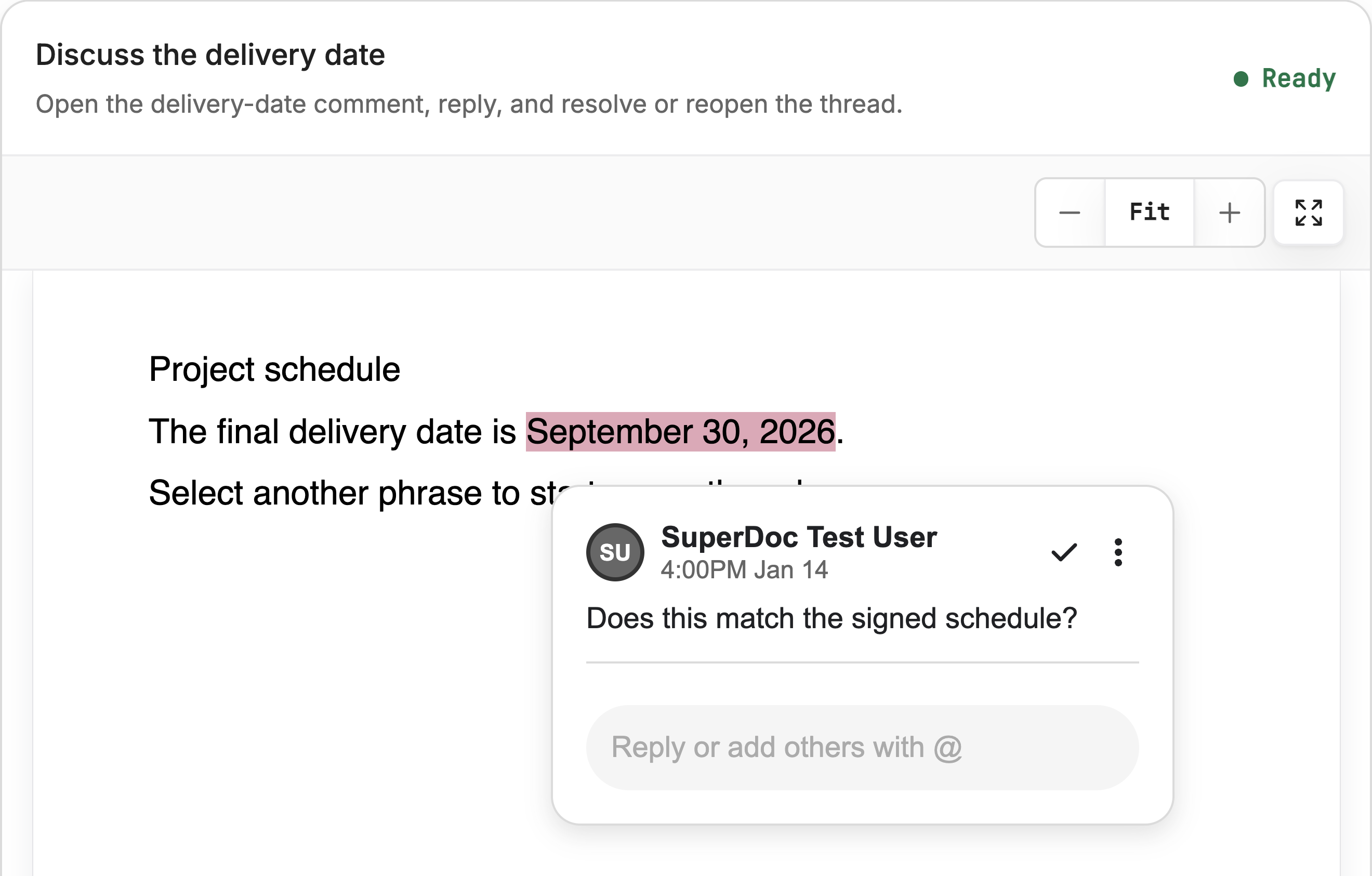
Real SuperDoc public comments example with synthetic content, captured at 4x. The image demonstrates the browser interface. The downloadable SDK 2.27.0 script separately checks comment export and reopening; Microsoft Word desktop rendering was not tested.
Try the live demoDownload the LinkedIn imagePublished 2026-11-12T01:42:28.966Z. By SuperDoc.
A delivery lead opens a statement of work and spots a problem: the final delivery date overlaps with the customer's launch freeze.
They need to ask about that date. The account owner needs to answer against the same passage. Later, someone may download the agreement and continue reviewing it in Word.
That is a concrete reason to embed comments in your product. The question, answer and document should travel together.
Start with the passage the reviewer is questioning
In SuperDoc, a comment thread can be attached to selected text. For this workflow, select the delivery date and ask whether it matches the project schedule.
Keep the question specific. “Does this match the signed schedule?” gives the next reviewer more to work with than a general note at the top of the file.
Open the interactive comment example and click the highlighted date to inspect the existing thread. The example uses synthetic content.
Give the discussion an owner
Configure the current user's name and email when you initialize the editor so newly created comments have an author. The built in comments setup includes the complete Vanilla and React examples.
Choose a layout that fits your product. A sidebar gives the thread its own space. Inline comments can work better in a narrow review panel. Auto layout selects between the available arrangements.
Then decide who can participate and who can resolve a thread. A delivery lead might be allowed to reply while the project owner makes the final resolve decision. Configure those browser actions through the interaction settings, and enforce access in your backend.
For a discussion-only browser instance, this current configuration keeps document text in Viewing mode, allows passage selection for comments, permits comment writing and blocks tracked-change decisions:
const discussionOptions = {
  documentMode: 'viewing',
  allowSelectionInViewMode: true,
  interaction: {
    comments: { level: 'write' },
    trackedChanges: { allowDecisions: false },
  },
} as const;
Spread these options into your editor initialization alongside the document and authenticated user's display details. Comment levels are cumulative: read exposes existing discussions, write adds discussion actions, and resolve additionally permits resolving and reopening when other checks allow. Suggesting mode governs new document edits; it does not reserve accept and reject for an approver.
The interface and authorization are separate. Hiding a comments panel with ui.comments: false does not remove comments or revoke an operation. The synchronous permissionResolver can refine supported client decisions, but a browser user, role or callback is not proof of server authorization. Enforce document reads, saves and collaboration access at your trusted boundary. If contributors must only comment, accepting an arbitrary edited DOCX upload does not establish that they changed comments alone.
Use a separately authorized reviewer configuration for the resolve decision. Test the contributor and reviewer paths with your application's actual identity and persistence rules. The SDK example below checks saved comment data; it does not test browser permission enforcement.
Keep the conversation and the agreement distinct
A resolved question records the state of the discussion. It does not update the date in the agreement.
If the reviewers agree on a new date, make that document edit separately. This helps the person reviewing the agreement distinguish “we discussed it” from “we changed it.”
For an agent that flags a date or other passage, the Document API comments guide shows how to create a comment against a document target. Use current document evidence to find the target, and retain the returned comment ID when adding a reply or updating its status.
Save the reviewed file
Follow the load and save guide to export the DOCX and store it through your application. Show a saved state after your storage request succeeds.
Before shipping, walk through the complete handoff:
-
Add a question to the delivery date and reply.
-
Resolve the thread, then reopen it.
-
Export and save the Word file.
-
Reopen the saved file in SuperDoc and Word.
-
Check the passage, author, replies and thread status.
The useful result is a reviewer opening the file and understanding both the question and the discussion that followed it. Try the comments example with your own review workflow in mind.
Run the saved file example
The downloadable comment-thread.mjs below was tested with SDK 2.27.0 and the public synthetic statement of work. Save the sample as getting-started.docx, then run:
npm install @superdoc/sdk@2.27.0
node comment-thread.mjs getting-started.docx comments.docx
The script writes a separate file and reopens it with the SDK to check the result. It stops when an output already exists. Inspect that file before retrying a mutation. Microsoft Word desktop rendering and your application's browser permissions were not tested by this script. Open the result in Word as part of your own evaluation.
For the separate accept or reject decision, use the tracked-change review guide.
Source and update context
This guide also incorporates the useful review questions from Caio Pizzol's Comments revamped announcement, March 5, 2026 and Missy Fox's Granular review permissions announcement, February 7, 2026. Updated November 11, 2026 with current comment levels, decision controls and authorization boundaries. The historical performance figures are not carried into this guide. Both original announcements retain their dates and attribution in the archive.
Runnable example files
Content ID: 38ec0f696c9d129670681265ed5bcba012523aa7c1f4919470374fa6b755cca1