Font Support
A document-aware font picker, editable font controls, and carefully selected fallbacks.
Word documents name fonts. Browsers render font files.
That gap is why a DOCX can look right in Word and different in a web editor. A browser can only render the fonts the host page loads, the fonts the operating system provides, and any font files the editor can resolve.
SuperDoc now keeps that contract explicit.
Small defaults in core
The core superdoc package does not ship the reviewed fallback font files. By default, the built-in toolbar shows a small baseline:
- Arial for sans-serif
- Times New Roman for serif
- Courier New for monospace
Those are the readable floor. They cover the common text categories without making your app download a font pack it may not need.
SuperDoc still preserves the Word-facing font name in the document. If a document uses a font your app has not loaded, the browser falls back the same way it would on any web page.
Add the fallback font package
If you want SuperDoc's reviewed fallback files, install the optional font package and pass it to the editor:
npm install @superdoc-dev/fonts
import { SuperDoc } from 'superdoc';
import { superdocFonts } from '@superdoc-dev/fonts';

new SuperDoc({
  selector: '#editor',
  document: 'contract.docx',
  fonts: superdocFonts,
});
The package contains the WOFF2 files and the resolver SuperDoc needs to load them. Your bundler emits the files and rewrites the URLs. No copy step. No public/fonts folder required.
Once the package is configured, SuperDoc can show the full reviewed font set and render the matching open fallback faces where available. The original Word font name is still what SuperDoc stores and exports.
Curate the set
You can also choose which bundled fallbacks are active:
import { createSuperDocFonts } from '@superdoc-dev/fonts';

new SuperDoc({
  selector: '#editor',
  document,
  fonts: createSuperDocFonts({
    include: ['Calibri', 'Times New Roman', 'Arial'],
  }),
});
Use Word-facing names in the include and exclude lists. For example, configure Calibri, not the fallback file family Carlito.
Load your own fonts
The package covers only the fallback faces SuperDoc provides and verifies. If your product needs an exact licensed font, load that font in the host app:
@font-face {
  font-family: 'Brand Sans';
  src: url('/fonts/BrandSans-Regular.woff2') format('woff2');
  font-display: swap;
}
Anything the browser can resolve is available to SuperDoc. Registering a font in the toolbar makes it selectable. Loading the font file makes it render.
Font picker behavior
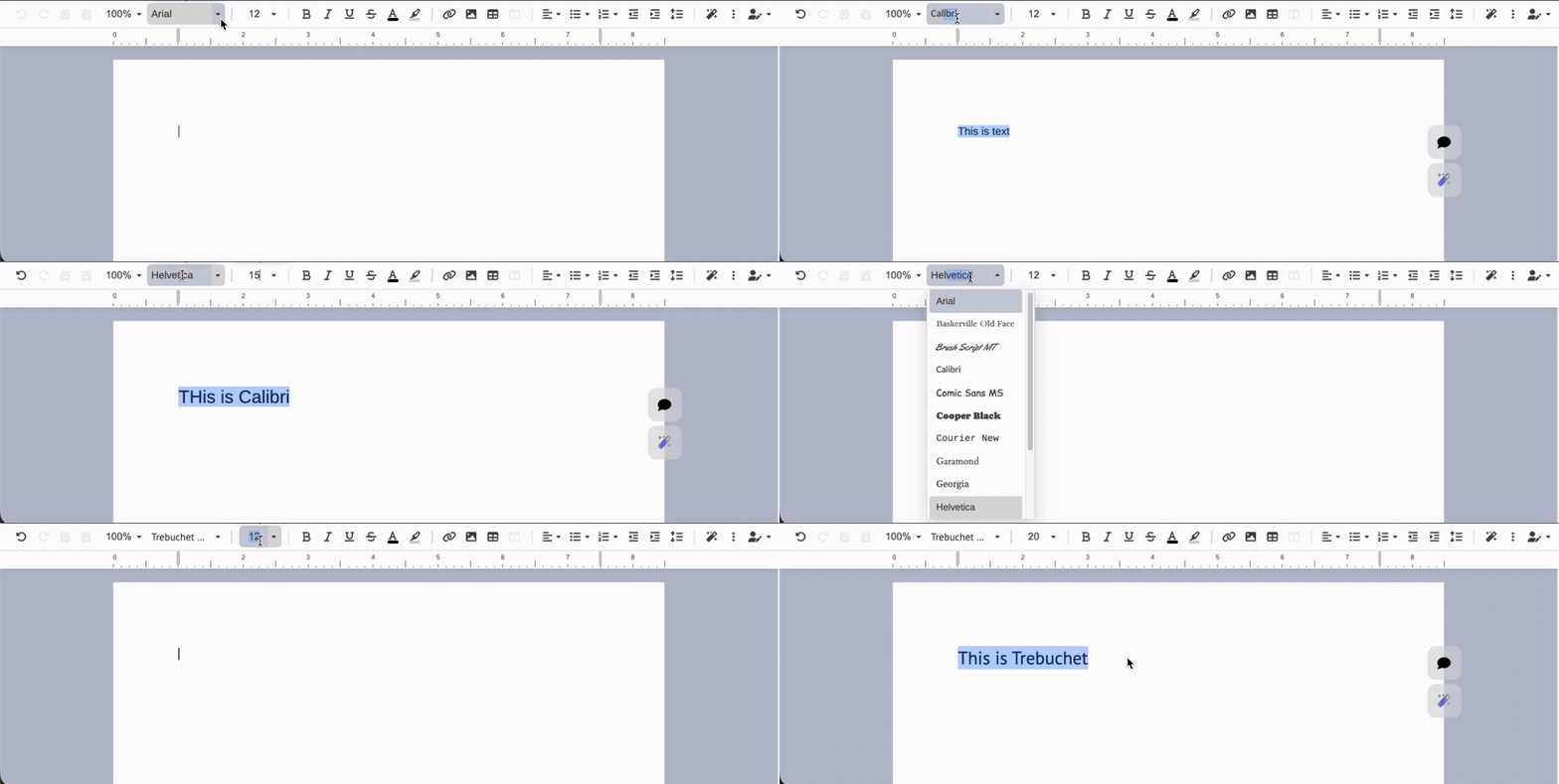
The toolbar font controls still behave like document editor controls.
The font family field is editable. Type to autocomplete, press Enter to apply, press Tab to move to font size, and press Tab again to return to the document. The caret opens the full list when you want to browse.
Font size follows the same split-control pattern: click the value to type, click the caret to open the menu.
Related docs
- Font support docs
- Built-in toolbar font configuration
- Custom UI font picker
- Custom UI API reference
- Font package on npm
The goal is simple: keep the core small, make the baseline predictable, and let apps opt into the reviewed fallback files when they want them.